
Legal matter intake and correspondence filing for law firmsEvery letter on the right matter, every deadline in someone's list
Dev Soft UK designs and builds legal matter intake and correspondence filing for law firms with DocView Capture, DocView Web and DocView OmniRead. Incoming post and e-mail are classified, client and matter numbers are read and checked, and each document is filed to its matter with tasks for its deadlines.
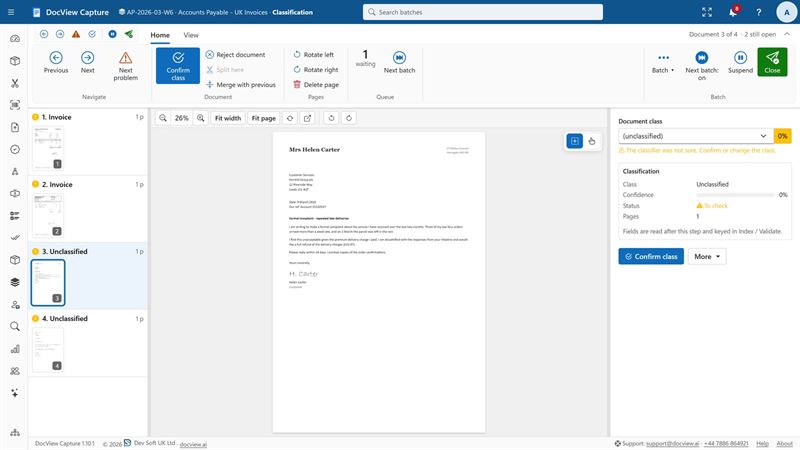
Correspondence that waits is a risk to the matter
Court orders, letters from the other side, completion statements and client instructions all arrive in the same post room and the same inboxes. Each one has to be recognised, matched to a client and matter, filed, and acted on before its date. When that depends on someone reading every envelope, a hearing date or a limitation deadline can sit unseen in a tray.
Receive
Scanned post and e-mail from fee-earner and firm mailboxes arrive in one place.
Classify
Each document is recognised: court document, letter, contract, ID, completion statement and so on.
Read and match
Client and matter numbers, parties, dates and deadlines are read and checked against your matter list.
File and act
The document goes to the matter, and its deadlines become tasks for the right fee-earner.
Included in DocView
- DocView Capture scanning from TWAIN and WIA scanners, plus import from IMAP, POP3 and Microsoft 365 mailboxes
- A mailroom setup that classifies post, including legal letters, and reads sender, reference and date
- Classification by rules or a classifier trained from your own samples, with uncertain documents sent for review
- Label, pattern and zone finders, and fuzzy database lookup against your master data
- Searchable PDF and PDF/A output to folders, SFTP, SQL databases and REST services
- Post-Scan storage locations by site, zone, rack and shelf, with a chain-of-custody history for boxes of originals
- DocView Web document cases, tasks, workflow, e-signatures and time-limited sharing
What we configure or build for you
- We configure document classes for your practice areas and train them on your samples
- We connect the matter lookup to your practice management system
- We can connect DocView to document management systems such as iManage and NetDocuments, filing by client and matter
- We build deadline tasks from court documents, such as hearing dates and claim numbers
- We set up conveyancing checklists for title documents, searches, ID, transfer deeds and completion statements
- We build a wills and deeds register with a retrieval and return workflow
- We configure client AML onboarding with identity and address evidence
Built around the work your firm does
The same intake can feed different matter types, each with its own checklist and tasks.
- Litigation and court documents
- Conveyancing
- Wills, deeds and probate
- Lasting powers of attorney
- Personal injury claims
- Immigration case bundles
- Corporate secretarial records
- Client identity and AML
- Contracts and NDAs
Law firms and in-house legal teams
Firms with a busy post room, shared inboxes and fee-earners who need to see new correspondence on the matter the day it arrives. In-house teams use the same approach for contracts, claims and regulatory letters.
Legal matter intake questions
Is this an off-the-shelf product?
No. It is DocView Capture and DocView Web configured for your firm's intake and, where needed, extended by Dev Soft UK, for example with a connection to your practice management or document management system.
Can it read our client and matter numbers?
Yes. Finders read references from the page, and a database lookup checks them against your matter list, so a mistyped or partly read number can still be matched. Anything uncertain goes to a person.
Do you work with iManage or NetDocuments?
We can connect DocView to document management systems such as iManage and NetDocuments as part of the project, so filed documents land in the right workspace.
How are deadlines handled?
We build rules that turn dates read from a document, such as a hearing date, into tasks for the fee-earner on the matter. The dates are checked by a person before tasks are created where you want that.
Where is our data held?
We can host it on Azure, AWS, Google Cloud or another provider of your choice, or install it on your own servers or cloud.
Put correspondence on the right matter
Send us a few sample documents and tell us how your post is handled today. We will show you how DocView could do it.