
Contract management softwareKnow what you signed, and what is coming up next
Dev Soft UK designs and builds contract management software for you with DocView Capture, DocView Web and DocView OmniRead. Contracts are requested, reviewed, approved, signed and filed in one register, with key dates that people are reminded about before they pass.
| Counterparty | Type | Expiry | Notice by | Status |
|---|---|---|---|---|
| Northfield Supplies | Supply | 31/03/2027 | 31/12/2026 | Active |
| Harbour Print Ltd | Services | 30/06/2027 | 31/03/2027 | Active |
| Kestrel Cleaning | Services | 15/01/2027 | 15/12/2026 | Active |
| Brightwater IT | Licence | 01/09/2027 | 01/06/2027 | In approval |
| Oakline Logistics | Variation | 31/03/2027 | - | Awaiting signature |
Illustration with sample data.
Contracts in inboxes, dates in nobody's diary
Signed contracts end up in e-mail threads, shared drives and filing cabinets. Variations are kept apart from the agreement they change. When a notice deadline passes unnoticed, a contract renews on terms nobody chose, or a supplier keeps being paid after the work has stopped.
Approvals suffer too: a small standard agreement waits in the same queue as a large, unusual one, and nobody can say who agreed what.
Dates that act on time
Expiry and notice dates kept as fields, so they can be searched, filtered and turned into reminders for the contract owner.
The life of a contract
Request
The business asks for a contract on a short form: counterparty, type, value and owner.
Review and approve
The route depends on type and value: a standard agreement goes one way, a large or unusual one goes to legal and finance.
Sign
The agreed version goes out for e-signature, and its status is tracked until it comes back.
File and remind
The signed copy joins the register with its key dates, and its owner is reminded before each notice deadline.
Built into DocView Web today
The foundations of a contract register and approval process are documented features of DocView Web.
Document types and fields
A contract document type with its own fields, access and saved filters, so the register opens the way each team needs it.
Workflow designer
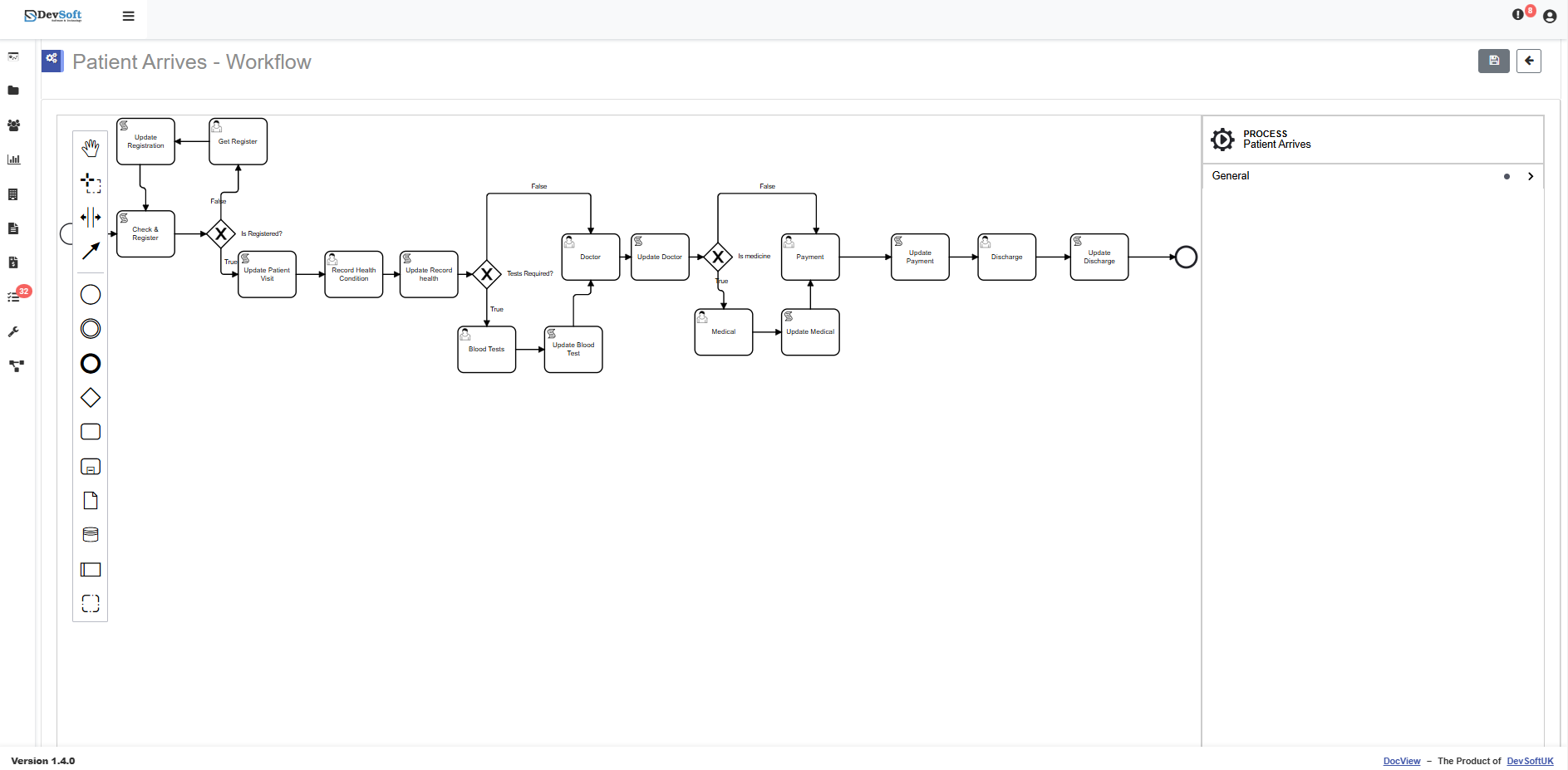
Approval routes with conditions on values, steps for a user or role, and forms that collect answers along the way.
E-signatures
Send a document for signature by e-mail and track its status.
Secure sharing
Share a draft by e-mail or link for a set period, with view or edit rights you choose.
Document cases
Group a master agreement with its schedules and variations, and give outside parties controlled access.
Chat with Documents
Ask a plain-English question about your contracts and get an answer that links to the source PDF.
Your contract types, your approval rules
We turn those building blocks into a contract process that matches how your business agrees and signs.
- We configure contract types and fields such as parties, value, term, expiry, renewal and notice period
- We design approval routes by contract type and value, with legal and finance steps where you need them
- We build reminders for notice deadlines and renewals, sent to the contract owner ahead of time
- We link amendments and variations to the master agreement they change
- We add obligation and milestone tasks, such as price reviews and deliverables
- We set up DocView Capture to read and index your existing paper and PDF contracts
- We can connect DocView to systems such as SharePoint, iManage, NetDocuments, DocuSign or Adobe Acrobat Sign
Find a clause without opening every file
Chat with Documents looks only in the contracts a person is allowed to see. Each answer links to the PDF, so the wording can be checked before anyone relies on it.
Who it is for
- Legal and commercial teams handling supplier and customer agreements
- Finance teams who need contract values and renewal dates
- Operations and procurement teams who own supplier relationships
What notice do we need to give Kestrel Cleaning to end the contract?
The agreement asks for one month's written notice before the expiry date of 15 January 2027.
Kestrel-Services-Agreement.pdf
Illustration with sample data.
Contract management questions
Is this an off-the-shelf product?
No. It is DocView Web configured for your contracts and, where needed, extended by Dev Soft UK. The register, workflow designer, e-signatures, sharing and Chat with Documents are part of DocView Web; reminders, obligation tasks and amendment links are things we build for your process.
Can approvals depend on contract value?
Yes. The workflow designer can send work down different routes based on conditions you set, such as sending contracts above a chosen value to a director.
Can we bring in our existing contracts?
Yes. Files can be uploaded or scanned into DocView Web, and for large volumes we set up DocView Capture to read and index them before they are filed.
Does it give legal advice on our contracts?
No. It helps you store, find, approve and track contracts. Decisions about the terms stay with your own legal team and advisers.
What does it cost?
DocView Web is priced on request, and our configuration work is quoted on your process. Talk to us and we will scope it with you.
Stop contracts renewing by accident
Show us how contracts are agreed and stored today, and we will design a register and approval process around them.