
E-signature workflowsApproved first, then signed, then filed where it belongs
Dev Soft UK designs and builds e-signature workflows for you with DocView Capture, DocView Web and DocView OmniRead. Signing becomes one step in a process: a document is checked and approved, sent for signature by e-mail, followed until it comes back, and stored with the rest of the file.
| Document | Signer | Sent | Status |
|---|---|---|---|
| Engagement letter 0577 | Client contact | 09/11/2026 | Signed |
| Supplier variation 12 | Supplier director | 10/11/2026 | Awaiting signature |
| Offer letter 2219 | Candidate | - | In approval |
| Loan agreement 0041 | Borrower | 12/11/2026 | Signed |
| Consent form 3302 | Parent or carer | 13/11/2026 | Awaiting signature |
Illustration with sample data.
Signing is easy. Everything around it is not.
Many teams already have a way to collect a signature, but it sits apart from the rest of their work. Someone downloads the agreed draft, uploads it to a separate signing tool, waits, then saves the signed PDF to a shared drive with a file name they invent on the day.
Along the way, documents get signed before anyone approved them, nobody notices a request that was never opened, and the signed copy cannot be found when it is needed.
Signature as a workflow step
The request goes out only after the approvals you require, and the next step starts when the signed copy is back.
From agreed draft to signed record
Prepare
The document is uploaded or created, given its type and fields, and attached to the right customer, supplier or case.
Approve
Reviewers approve or reject it in a workflow task, so only the agreed version can move on.
Send and track
It goes to the signer by e-mail, and its status can be followed until the signature is complete.
Chase and file
Slow signers are reminded, and the signed copy is stored with its fields and its history.
What DocView Web already gives you
These parts are documented features of DocView Web today.
E-signatures
Send a document for electronic signature by e-mail and follow its status from DocView Web.
Approval before sending
The workflow designer assigns review steps to a user or role, with Approve, Reject or your own actions.
Automatic start
A workflow can start when a document is uploaded, or by hand from the document itself.
Secure sharing
Let someone read a draft before it is signed, by e-mail or link, for dates you set and with view or edit rights.
Document history
A record of what happened to each document and who did it, kept beside the file.
Document types
Signed documents are stored by type with their own fields and saved filters, so they are found by name, date or reference.
Signing that fits each kind of document
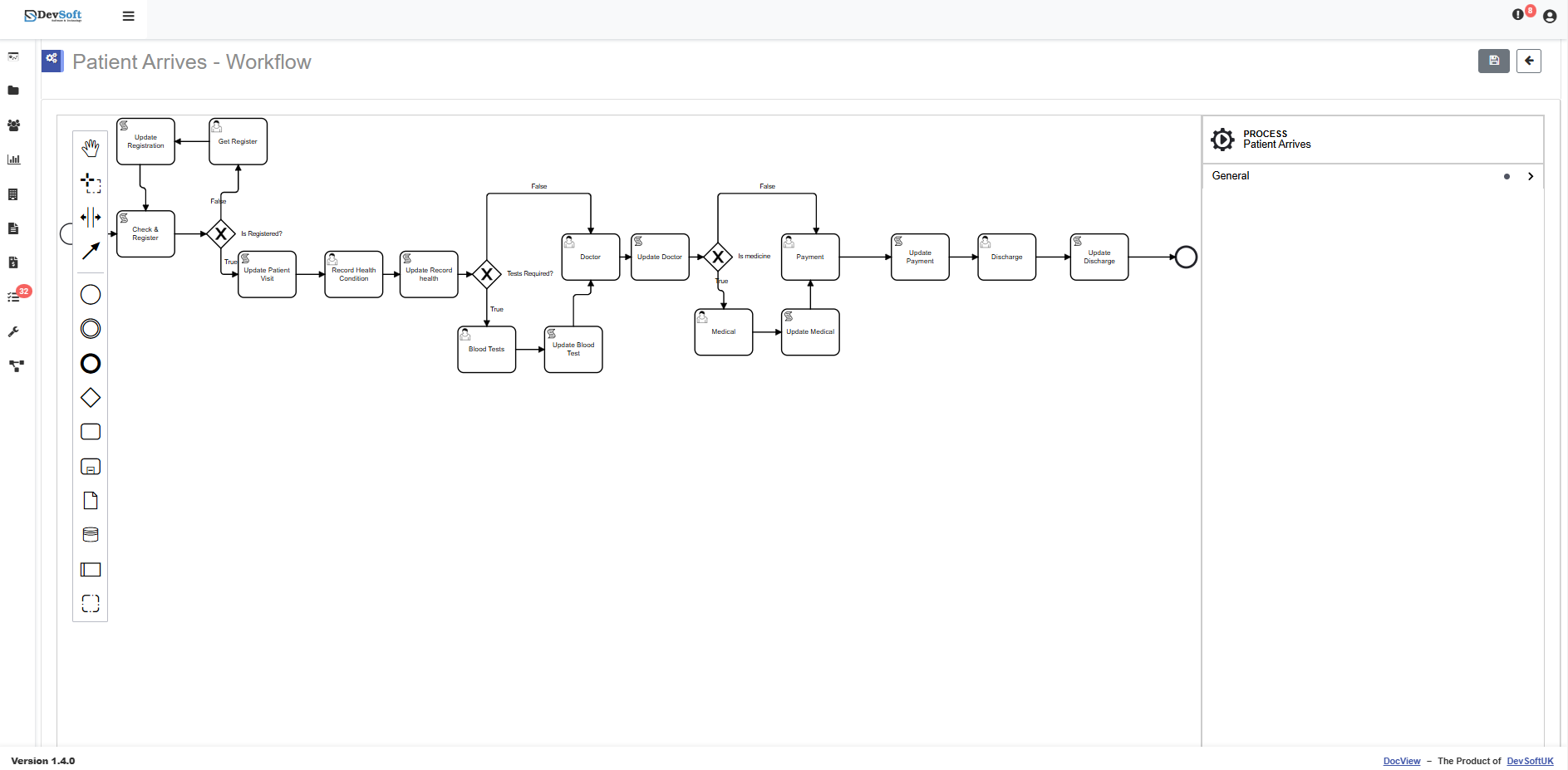
An offer letter, a supplier variation and a consent form need different approvals and different follow-up. We design each route with you.
- We configure which documents need approval before signature, and who gives it
- We build reminders to signers who have not completed, and alerts to the sender when a request stalls
- We set the order of signers using workflow steps, where more than one person must sign
- We configure what happens next: filing the signed copy, updating its status field and starting the following task
- We can add document generation from your templates, so the letter or agreement is filled in from the record
- We set up DocView Capture to scan wet-ink copies returned by post and file them with the same fields
- We can connect DocView to systems such as DocuSign or Adobe Acrobat Sign if you already use one
Teams that send the same kinds of document for signature again and again
HR and recruitment
Offer letters, contracts of employment and changes to terms, signed before a start date.
Professional services
Engagement letters and terms of business that must be signed before work begins.
Sales and procurement
Customer orders, supplier agreements and variations that follow an approval chain.
Signing is one stage in the life of an agreement. For requests, registers and renewal dates, see contract management.
E-signature workflow questions
Is this an off-the-shelf product?
No. It is DocView Web configured for the documents you send for signature and, where needed, extended by Dev Soft UK. Sending for signature by e-mail, status tracking, workflows and document history are part of DocView Web; reminders, signer order, generated documents and outside connections are things we build for your process.
Can a document be signed before it is approved?
Not if the workflow is designed that way. We place the signature step after the approval steps you require, so a rejected or unapproved draft never reaches the signer.
Can we see which requests are still waiting?
Yes. DocView Web tracks the status of each document sent for signature, and we can add a saved filter or dashboard list of everything still out, grouped by sender or document type.
We already use another signing service. Can we keep it?
Yes. We can connect DocView to systems such as DocuSign or Adobe Acrobat Sign, so approvals and filing happen in DocView while the signature is collected where you are used to it.
Is an electronic signature right for every document?
Not always. Some documents have particular rules about how they are signed or witnessed. That is a legal question for your own advisers; we then set up the process to match their advice.
Put signing inside the process
Tell us which documents you send for signature and who approves them first. We will design the route from draft to signed record.